
给你的 Spring Boot 项目一键接入 ChatGPT 级对话界面:Spring AI LoomAgent 教程
Spring AI LoomAgent是一个基于Spring Boot 3.x和Spring AI 1.x的自动配置库,通过引入starter依赖即可快速为应用添加AI功能。主要特性包括:开箱即用的聊天UI(支持流式对话、多轮会话等)、RAG知识库(文件上传、解析、向量化)、MCP工具调用(12+预置服务)和Skill技能库(参数化表单、工作流模板)。技术栈采用JDK 17+/Spring Boo
只要引入一个 starter 依赖,就能为你的 Spring AI 应用注入开箱即用的聊天 UI、RAG 知识库、MCP 工具调用和 Skill 技能库。
一、项目简介
Spring AI LoomAgent 是一个基于 Spring Boot 3.x + Spring AI 1.x 的自动配置库。它通过一个 starter 依赖即可为你的项目注入以下能力:
| 模块 | 功能 |
|---|---|
| 聊天界面 | SSE 流式对话、多轮会话、模型推理(Thinking)折叠展示、一键复制、Markdown 下载 |
| RAG 知识库 | 多知识库 CRUD、文件上传→Tika 解析→向量化、LLM 元数据增强、JVector HNSW 向量库(持久化到磁盘) |
| MCP 服务集成 | 同步/异步 MCP 客户端、预配置 12+ MCP 服务(搜索、地图、天气、图表、浏览器自动化等)、按会话启用/禁用 |
| Skill 技能库 | 预定义技能模板、参数化表单、Skill 与 MCP 工具的绑定、LLM 自动发现与调用 |
| 用户认证 | Token 认证过滤器、自动登录、localStorage 会话持久化 |
| 可扩展性 | 所有组件遵循"接口 + 默认实现"模式,通过 @ConditionalOnMissingBean 实现完整可替换 |
技术栈:JDK 17+ / Spring Boot 3.x / Spring AI 1.x / H2 / JVector / Flyway / Vue.js SPA
二、快速开始:3 步获得聊天界面
1. 引入 LoomAgent
<!-- 统一管理 Spring AI 版本 -->
<dependencyManagement>
    <dependencies>
        <dependency>
            <groupId>org.springframework.ai</groupId>
            <artifactId>spring-ai-bom</artifactId>
            <version>1.1.5</version>
            <type>pom</type>
            <scope>import</scope>
        </dependency>
    </dependencies>
</dependencyManagement>

<!-- 核心 starter -->
<dependencies>
    <dependency>
        <groupId>io.github.wb04307201</groupId>
        <artifactId>spring-ai-loom-agent-spring-boot-starter</artifactId>
        <version>1.1.19</version>
    </dependency>
</dependencies>
2. 引入一个 LLM 模型依赖
以阿里通义千问(DashScope)为例:
<dependency>
    <groupId>com.alibaba.cloud.ai</groupId>
    <artifactId>spring-ai-alibaba-starter-dashscope</artifactId>
    <version>1.1.2.2</version>
</dependency>
application.yml 配置:
spring:
  ai:
    dashscope:
      api-key: ${DASHSCOPE_API_KEY}    # 你的 API Key
    chat:
      options:
        model: qwen3.6-plus
        multi_model: true
        enable_thinking: true           # 开启深度思考
    embedding:
      options:
        model: text-embedding-v2       # 向量模型
支持 OpenAI、DeepSeek、Ollama、智谱等所有 Spring AI 支持的模型。
3. 启动项目
mvn spring-boot:run
浏览器访问:http://localhost:8080/spring/ai/loom
你会看到一个完整的聊天界面:左侧会话历史,底部消息输入框,支持流式输出、Markdown 渲染。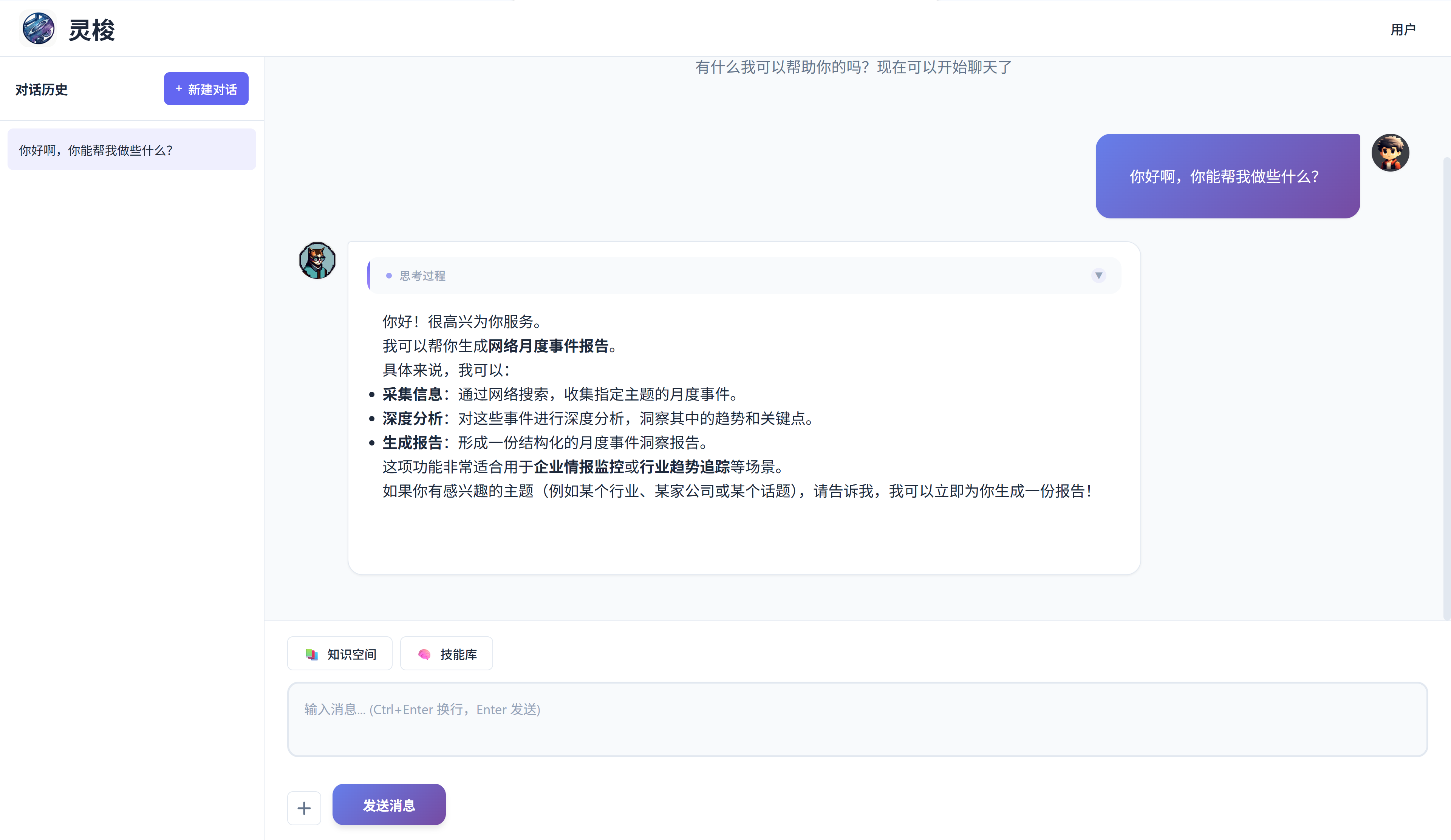
三、搭建 RAG 知识库
LoomAgent 默认使用 JVector HNSW 向量库,数据存储在 H2 数据库中。开箱即用,无需额外部署。
替换为外部向量库(以 Qdrant 为例)
<dependency>
    <groupId>org.springframework.ai</groupId>
    <artifactId>spring-ai-starter-vector-store-qdrant</artifactId>
</dependency>
spring:
  ai:
    vectorstore:
      qdrant:
        host: localhost
        port: 6334
        collection-name: my-collection
自定义 RAG 参数
spring:
  ai:
    loom:
      agent:
        rag:
          similarityThreshold: 0.50     # 相似度阈值,默认 0.0
          topK: 4                       # 返回 Top-k 条结果
          defaultPromptTemplate: |      # 自定义 RAG 提示词
            Context information is below.
            ---------------------
            {context}
            ---------------------
            Given the context information and no prior knowledge, answer the query.
            1. If the answer is not in the context, just say that you don't know.
            Query: {query}
            Answer:
文件上传流程:上传文件 → Tika 解析 → LLM 关键词/摘要元数据增强 → 文档切分 → 向量化 → 入库
四、接入 MCP 工具调用
MCP(Model Context Protocol)是 Anthropic 提出的模型上下文协议,允许 LLM 调用外部服务。
1. 添加 MCP 客户端依赖
<dependency>
    <groupId>org.springframework.ai</groupId>
    <artifactId>spring-ai-starter-mcp-client</artifactId>
</dependency>
2. 配置 MCP Server
mcp-servers.json(放在 src/main/resources/):
{
  "mcpServers": {
    "time": {
      "command": "uvx",
      "args": [
        "mcp-server-time",
        "--local-timezone=Asia/Shanghai"
      ]
    }
  }
}
application.yml:
spring:
  ai:
    mcp:
      client:
        stdio:
          servers-configuration: classpath:mcp-servers.json
3. 自定义 MCP 服务描述(可选)
spring:
  ai:
    loom:
      agent:
        mcps:
          - name: spring-ai-mcp-client - time
            title: ⏰ 时间服务
            description: 提供当前时间和时区转换功能
            tools:
              - name: get_current_time
                description: 获取指定时区的当前时间
              - name: convert_time
                description: 在不同时区之间转换时间
配置后,聊天界面会出现 MCP 按钮,用户可以按启用/禁用服务。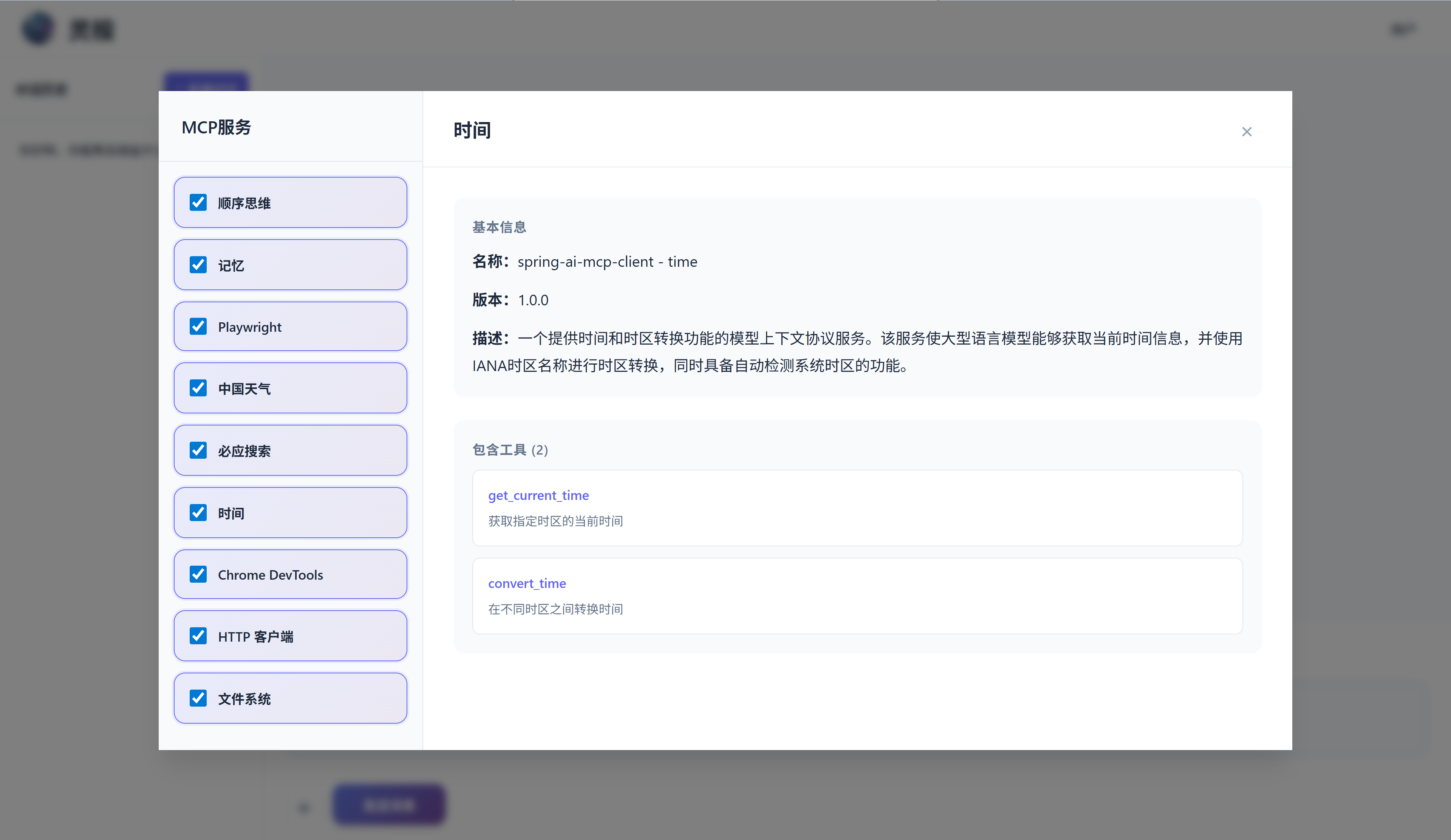
五、Skill 技能库
Skill 是可以复用的 LLM 工作流模板,支持参数化表单、MCP 工具绑定,LLM 可以自动发现并调用。
示例:月度事件报告
spring:
  ai:
    loom:
      agent:
        skills:
          - name: Monthly Event Report
            description: 通过搜索获取指定主题的月度事件,生成深度分析报告
            tools:
              - spring-ai-mcp-client - time
              - spring-ai-mcp-client - sequential-thinking
              - spring-ai-mcp-client - bing-search
            content: classpath:skills/news-watch.st
            params:
              - name: param1
                label: 主题
                type: text
                required: true
                default-value: 科技
技能模板文件 src/main/resources/skills/news-watch.st:
搜索网络获取当前年度 {param1} 的重要月度事件,通过深入分析生成洞察报告。要求:
- 使用 @get_current_time 获取当前时间
- 使用 @sequentialthinking 规划所有步骤、思考和分支
- 使用 @bing_search 逐月搜索重要事件,每轮 Thinking 前先搜索验证
- 使用 @crawl_webpage 查看搜索结果的网页详情
- Thinking 轮次不少于 5 轮
- 每次需要根据查询结果反思决策是否正确
- 进行事件关联分析,形成结论,生成"月度事件报告"
用户通过 UI 上的 Skill 按钮选择技能并填写参数,也可以直接在对话中调用。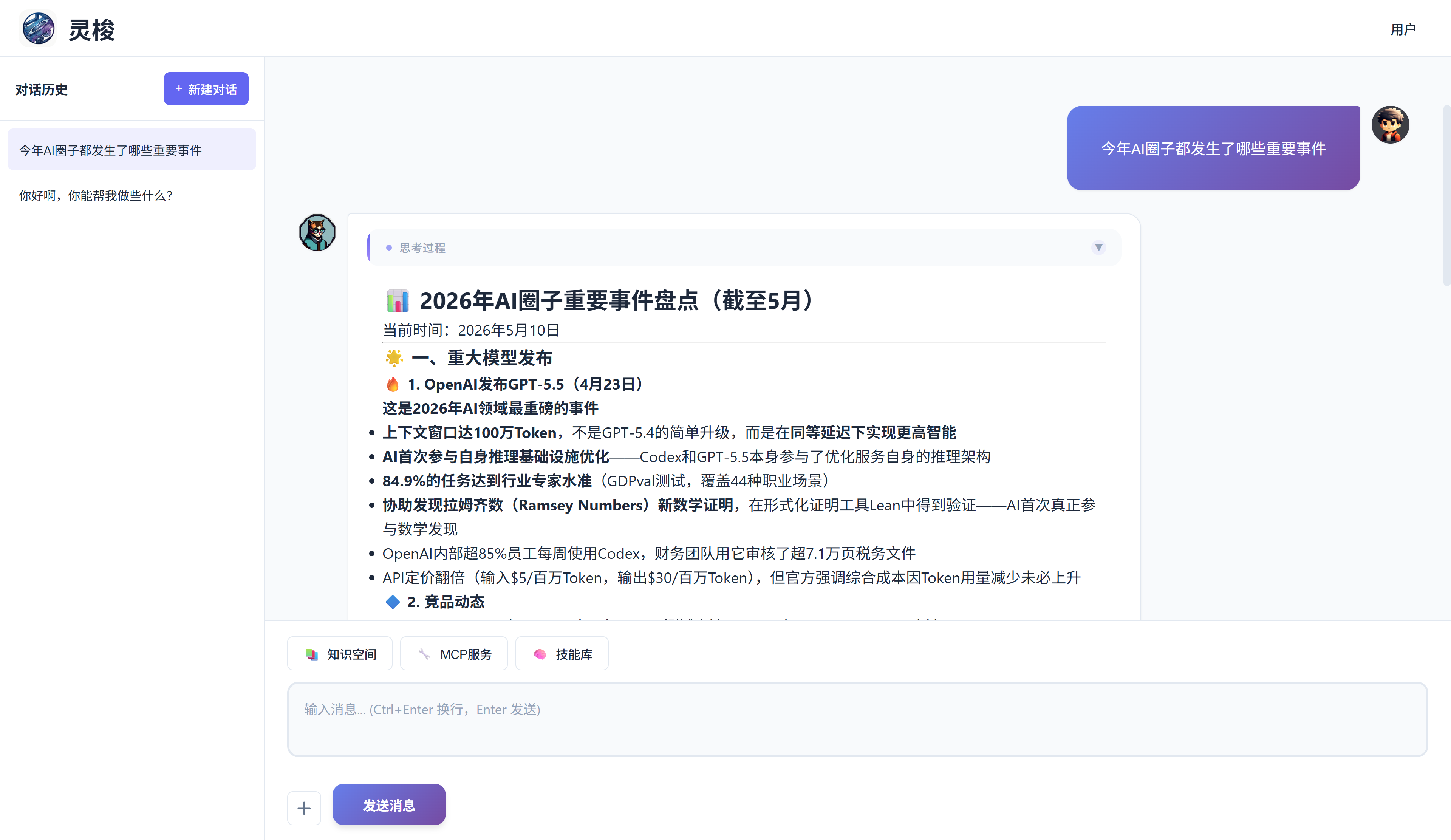
六、替换任意组件
LoomAgent 的所有组件都遵循 接口 + 默认实现 模式,通过 @ConditionalOnMissingBean 注册。替换任意组件只需提供一个同名 Bean:
@Bean
@ConditionalOnMissingBean
public IChat customChat(ChatClient.Builder builder) {
    // 你的自定义实现
    return new MyCustomChat(builder.build());
}
| 组件接口 | 默认实现 | 用途 |
|---|---|---|
IChat |
DefaultChat |
聊天 SSE 流式输出、MCP 工具编排 |
IKnowledge |
DefaultKnowledge |
知识库 CRUD |
IMcp |
SyncMcp / ASyncMcp |
MCP 客户端封装 |
ISkillStorage |
DefaultSkillStorage |
技能模板存储 |
IFile |
DefaultFile |
文件元数据管理 |
IUpload |
DefaultUpload |
文件上传→解析→向量化管道 |
IUser |
DefaultUser |
认证过滤器 |
七、项目结构
spring-ai-loom-agent/                  # 核心库
├── spring-ai-loom-agent/              #   核心组件 + 前端静态资源 (Vue SPA)
├── spring-ai-loom-agent-spring-boot-autoconfigure/  # 自动配置
├── spring-ai-loom-agent-spring-boot-starter/        # Starter 空 JAR
└── spring-ai-loom-agent-test/         #   测试应用
八、总结
| 特性 | 说明 |
|---|---|
| 零侵入 | 只需一个 starter 依赖即可获得完整的聊天 UI |
| 高度可扩展 | 所有组件可通过 @Bean 替换,无需修改源码 |
| 多模型支持 | 兼容 Spring AI 所有模型/向量库/记忆方案 |
| 生产就绪 | Flyway 数据库迁移、JVector HNSW 索引持久化、Token 认证 |
如果有帮助到你,欢迎 Star ⭐
文章基于 Spring AI LoomAgent 1.1.19 / Spring AI 1.1.5 / Spring Boot 3.5.14 编写。

AtomGit AI 社区提供模型库、数据集、Agent、Token等资源
更多推荐

 9
9 0
0- 0


 已为社区贡献1条内容

所有评论(0)