
Superpowers 与 Trae 集成指南
·
本文档说明如何将 Superpowers 项目集成到 Trae IDE 中,使其具备完整的技能系统和子代理能力。
目录
1. 下载 Superpowers 源码
方式一:通过 Git Clone(推荐)
# 克隆仓库到本地 git clone https://github.com/obra/superpowers.git # 或者克隆到你喜欢的目录 cd ~/workspace git clone https://github.com/obra/superpowers.git 方式二:下载 ZIP 包
# 下载最新版本 curl -L https://github.com/obra/superpowers/archive/refs/heads/main.zip -o superpowers.zip # 解压 unzip superpowers.zip 验证下载
确保以下目录存在:
superpowers/ ├── skills/ # 技能目录 │ ├── brainstorming/ │ ├── dispatching-parallel-agents/ │ ├── executing-plans/ │ ├── finishing-a-development-branch/ │ ├── receiving-code-review/ │ ├── requesting-code-review/ │ ├── subagent-driven-development/ │ ├── systematic-debugging/ │ ├── test-driven-development/ │ ├── using-superpowers/ │ ├── verification-before-completion/ │ ├── writing-plans/ │ └── writing-skills/ └── agents/ # 代理配置目录 └── code-reviewer.md 2.下载Trae-Work
 https://www.trae.cn/?utm_source=360&utm_medium=360_sem&utm_campaign=48525246&utm_term=trae_sem_360_wc_pc_1_ocpc_pinp_hx_tongy&account_id=3524398901&ad_platform_id=360_search_lead&new_user=1&a_keywordid=70179093948&ug_ad_level_3_id=11996710867&ug_ad_level_2_id=16534210&ug_ad_level_1_id=214020492&ug_device=pc&ug_semver=v1.0.0&qhclickid=96101a8428a79fbf
复制 Skills 到 Trae Work
目标目录
Trae 的技能目录位于:
~/.trae_cn/skills/ 复制步骤
第一种模式
在skills目录下放置Superpowers的技能
第二种模式
打开Trae Work桌面端,点击左侧技能按钮,点击上传技能,上传Superpowers各个技能的SKILL.md文件。
需要复制的核心技能
以下是 Superpowers 的核心技能列表:
| 技能名称 | 用途 | 优先级 |
|---|---|---|
using-superpowers |
技能系统入口,必须在每个会话开始时调用 | 最高 |
brainstorming |
创意设计,在任何编码工作前进行需求探索 | 高 |
writing-plans |
编写详细的实施计划 | 高 |
subagent-driven-development |
子代理驱动开发流程 | 高 |
executing-plans |
执行实施计划 | 高 |
test-driven-development |
测试驱动开发(TDD) | 高 |
systematic-debugging |
系统化调试流程 | 高 |
requesting-code-review |
请求代码审查 | 中 |
receiving-code-review |
接收代码审查反馈 | 中 |
finishing-a-development-branch |
完成开发分支的合并流程 | 中 |
verification-before-completion |
完成前验证 | 中 |
dispatching-parallel-agents |
并行代理调度 | 中 |
writing-skills |
创建新技能 | 低 |
技能文件结构
每个技能目录包含:
skill-name/ ├── SKILL.md # 主技能文件(必需) ├── *.md # 辅助文档和提示词模板 └── scripts/ # 可选的脚本文件 3. 配置默认提示词
新建一个using-superpowers.md文件
<SUBAGENT-STOP> If you were dispatched as a subagent to execute a specific task, ignore this skill. </SUBAGENT-STOP> <EXTREMELY-IMPORTANT> If you think there is even a 1% chance a skill might apply to what you are doing, you ABSOLUTELY MUST invoke the skill.
IF A SKILL APPLIES TO YOUR TASK, YOU DO NOT HAVE A CHOICE. YOU MUST USE IT.

This is not negotiable. You cannot rationalize your way out of this. </EXTREMELY-IMPORTANT>

The Rule
Invoke relevant or requested skills BEFORE any response or action — including clarifying questions, exploring the codebase, or checking files. If it turns out wrong for the situation, you don't have to use it.

Before entering plan mode: if you haven't already brainstormed, invoke the brainstorming skill first.

Then announce "Using [skill] to [purpose]" and follow the skill exactly. If it has a checklist, create a todo per item.

Skill Priority
When multiple skills apply, process skills come first — they set the approach, then implementation skills (frontend-design, etc.) carry it out. Brainstorming and systematic-debugging are Superpowers' most common process skills, but the rule holds for any of them.

"Let's build X" → superpowers:brainstorming first, then implementation skills.
"Fix this bug" → superpowers:systematic-debugging first, then domain skills.
Red Flags
These thoughts mean STOP—you're rationalizing:

Thought	Reality
"This is just a simple question"	Questions are tasks. Check for skills.
"I need more context first"	Skill check comes BEFORE clarifying questions.
"Let me explore the codebase first"	Skills tell you HOW to explore. Check first.
"I can check git/files quickly"	Files lack conversation context. Check for skills.
"Let me gather information first"	Skills tell you HOW to gather information.
"This doesn't need a formal skill"	If a skill exists, use it.
"I remember this skill"	Skills evolve. Read current version.
"This doesn't count as a task"	Action = task. Check for skills.
"The skill is overkill"	Simple things become complex. Use it.
"I'll just do this one thing first"	Check BEFORE doing anything.
"This feels productive"	Undisciplined action wastes time. Skills prevent this.
"I know what that means"	Knowing the concept ≠ using the skill. Invoke it.
Platform Adaptation
If your harness appears here, read its reference file for special instructions:

Codex: references/codex-tools.md
Pi: references/pi-tools.md
Antigravity: references/antigravity-tools.md
User Instructions
User instructions (CLAUDE.md, AGENTS.md, GEMINI.md, etc, direct requests) take precedence over skills, which in turn override default behavior. Only skip skill workflows or instructions when your human partner has explicitly told you to.
将using-superpowers.md文件上传到skill目录或者通过桌面端上传技能。
4. 会话测试
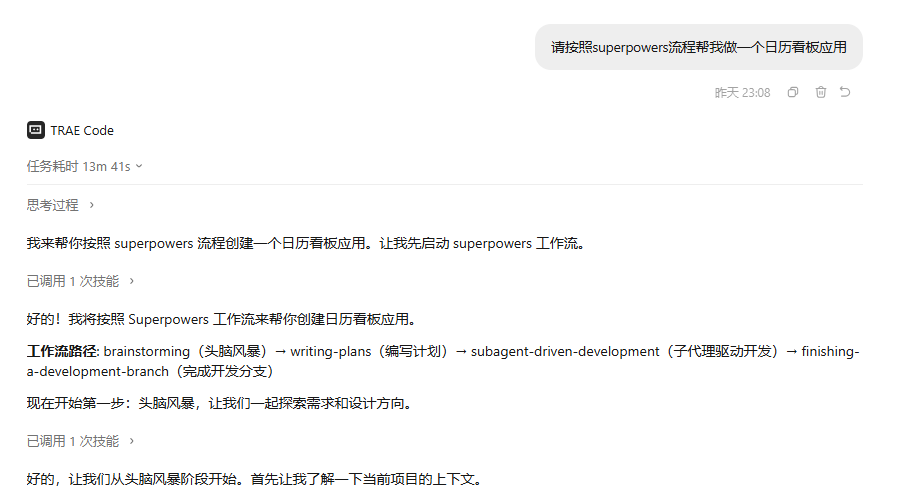
此时新建个窗口,尝试输入例如”请按照superpowers流程帮我做一个日历看板应用“,若出现头脑风暴等环节则说明测试成功了。
完整集成验证清单
- Superpowers 源码已下载到本地
- 所有技能已复制到
~/.trae_cn/skills/ - 配置默认提示词
- 新会话测试成功

AtomGit AI 社区提供模型库、数据集、Agent、Token等资源
更多推荐
 17
17 0
0- 0


 已为社区贡献1条内容

所有评论(0)