
MCP+A2A 从0到1构建类Manus多Agent全栈应用
·
1、深入理解DeepSeek与GPT模型的工具调用
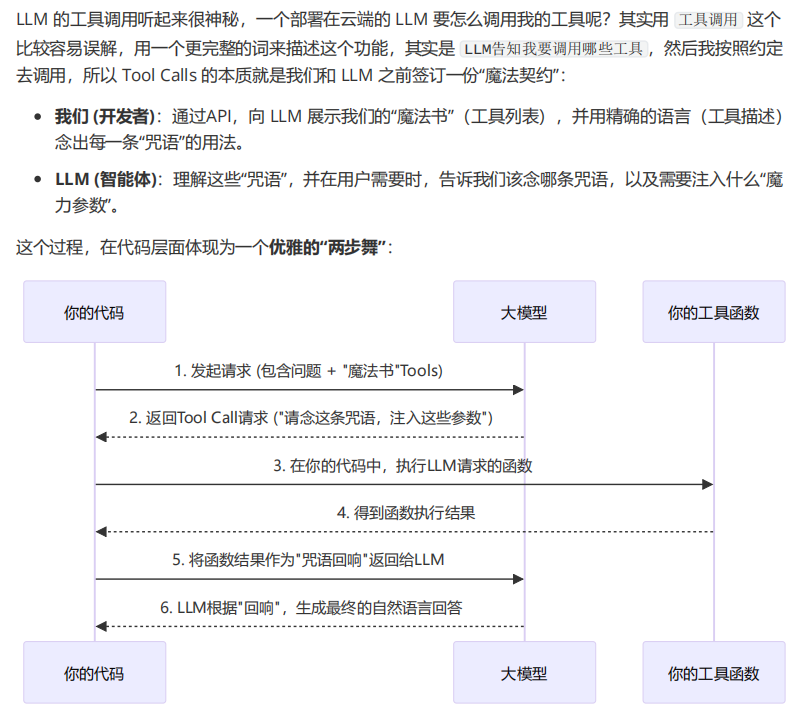
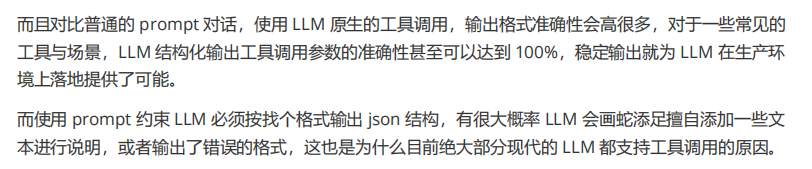
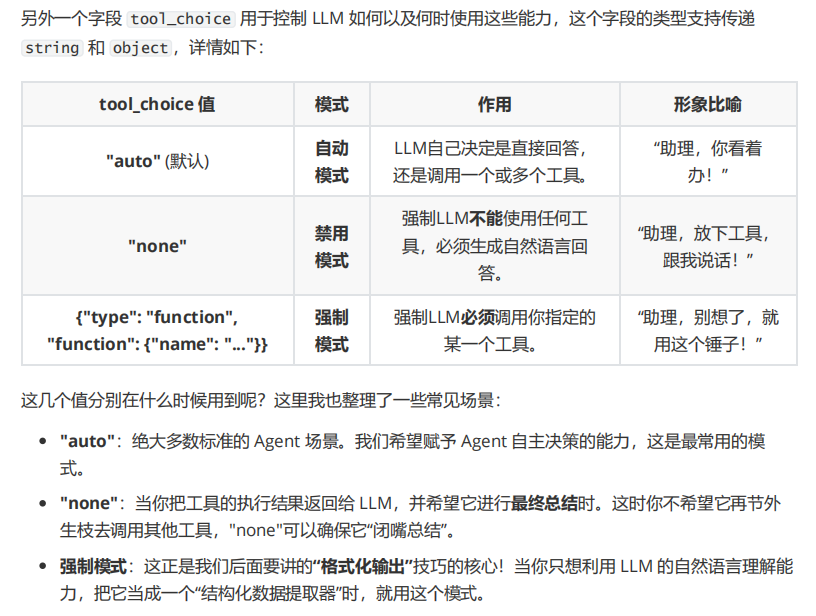
1、工具调用参数精细化解读

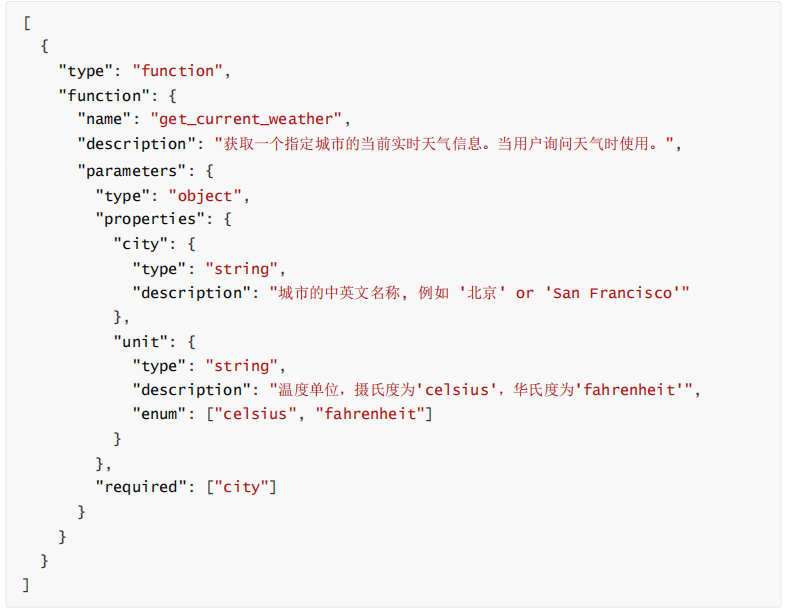
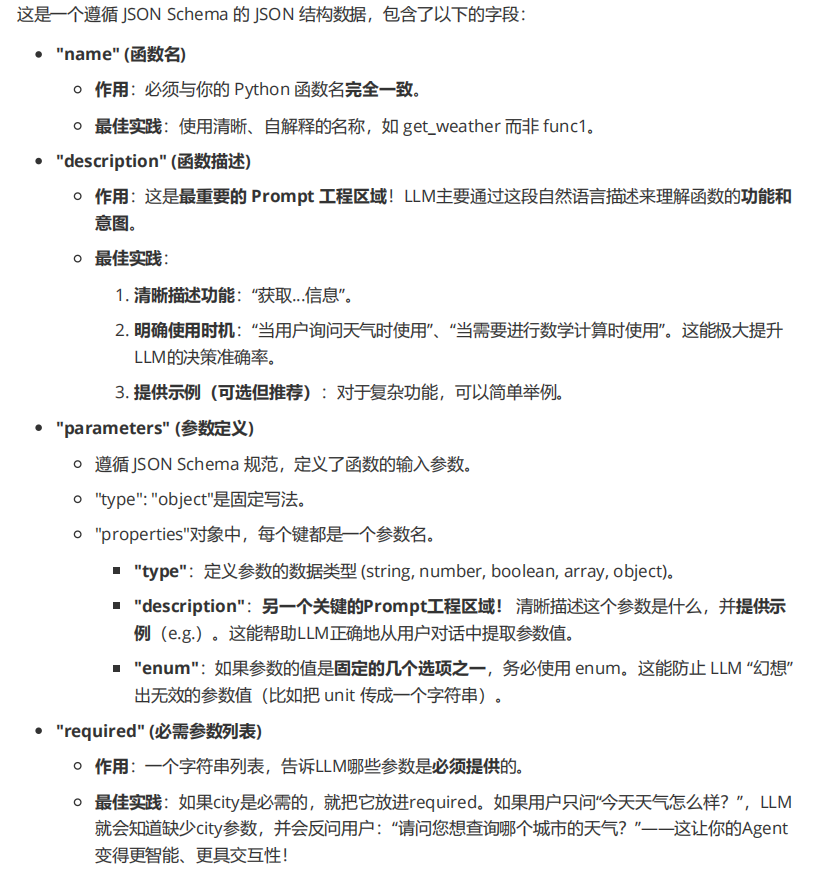

#!/usr/bin/env python
# -*- coding: utf-8 -*-
"""
@Time    : 2025/7/5 0:36
@Author  : thezehui@gmail.com
@File    : 3_7_为ReAct Agent添加计算工具.py
"""
import json

import dotenv
from openai import OpenAI

dotenv.load_dotenv()


def calculator(expression: str) -> str:
    """一个简单的计算器,可以执行数学表达式"""
    try:
        result = eval(expression)
        return json.dumps({"result": result})
    except Exception as e:
        return json.dumps({"error": f"无效表达式, 错误信息: {str(e)}"})


class ReActAgent:
    def __init__(self):
        self.client = OpenAI(base_url="http://192.168.8.221:9026/v1")
        self.messages = [
            {
                "role": "system",
                "content": "你是一个强大的聊天机器人,请根据用户的提问进行答复,如果需要调用工具请直接调用,不知道请直接回复不清楚"
            }
        ]
        self.model = "Qwen3.5-27B-FP8"
        self.available_tools = {"calculator": calculator}
        self.tools = [
            {
                "type": "function",
                "function": {
                    "name": "calculator",
                    "description": "一个可以计算数学表达式的计算器",
                    "parameters": {
                        "type": "object",
                        "properties": {
                            "expression": {
                                "type": "string",
                                "description": "需要计算的数学表达式,例如:'123+456+789'"
                            }
                        },
                        "required": ["expression"]
                    }
                }
            }
        ]

    def process_query(self, query: str) -> str:
        """使用deepseek处理用户输出"""
        self.messages.append({"role": "user", "content": query})

        # 调用deepseek发起请求
        response = self.client.chat.completions.create(
            model=self.model,
            messages=self.messages,
            tools=self.tools,
        )

        # 获取响应消息+工具响应
        response_message = response.choices[0].message
        tool_calls = response_message.tool_calls

        # 将模型第一次回复添加到历史消息中
        self.messages.append(response_message.model_dump())

        # 判断是否执行工具调用
        if tool_calls:

            # 循环执行工具调用
            for tool_call in tool_calls:
                print("Tool Call: ", tool_call.function.name)
                tool_name = tool_call.function.name   # 工具名称
                tool_args = json.loads(tool_call.function.arguments)   # 所需参数
                function_to_call = self.available_tools[tool_name]   # 工具函数

                # 调用工具
                result = function_to_call(**tool_args)
                print(f"Tool [{tool_name}] Result: {result}")

                # 将工具结果添加到历史消息中
                self.messages.append({
                    "tool_call_id": tool_call.id,
                    "role": "tool",
                    "name": tool_name,
                    "content": result,
                })

            # 再次调用模型,让它基于工具调用的结果生成最终回复内容
            second_response = self.client.chat.completions.create(
                model=self.model,
                messages=self.messages,
                tools=self.tools,
                tool_choice="none",
            )

            self.messages.append(second_response.choices[0].message.model_dump())
            return "Assistant: " + second_response.choices[0].message.content
        else:
            return "Assistant: " + response_message.content

    def chat_loop(self):
        """运行循环对话"""
        while True:
            try:
                # 获取用户的输入
                query = input("\nQuery: ").strip()
                if query.lower() == "quit":
                    break
                print(self.process_query(query))
            except Exception as e:
                print(f"\nError: {str(e)}")


if __name__ == "__main__":
    ReActAgent().chat_loop()
2、Pydantic数据校验即数据解析
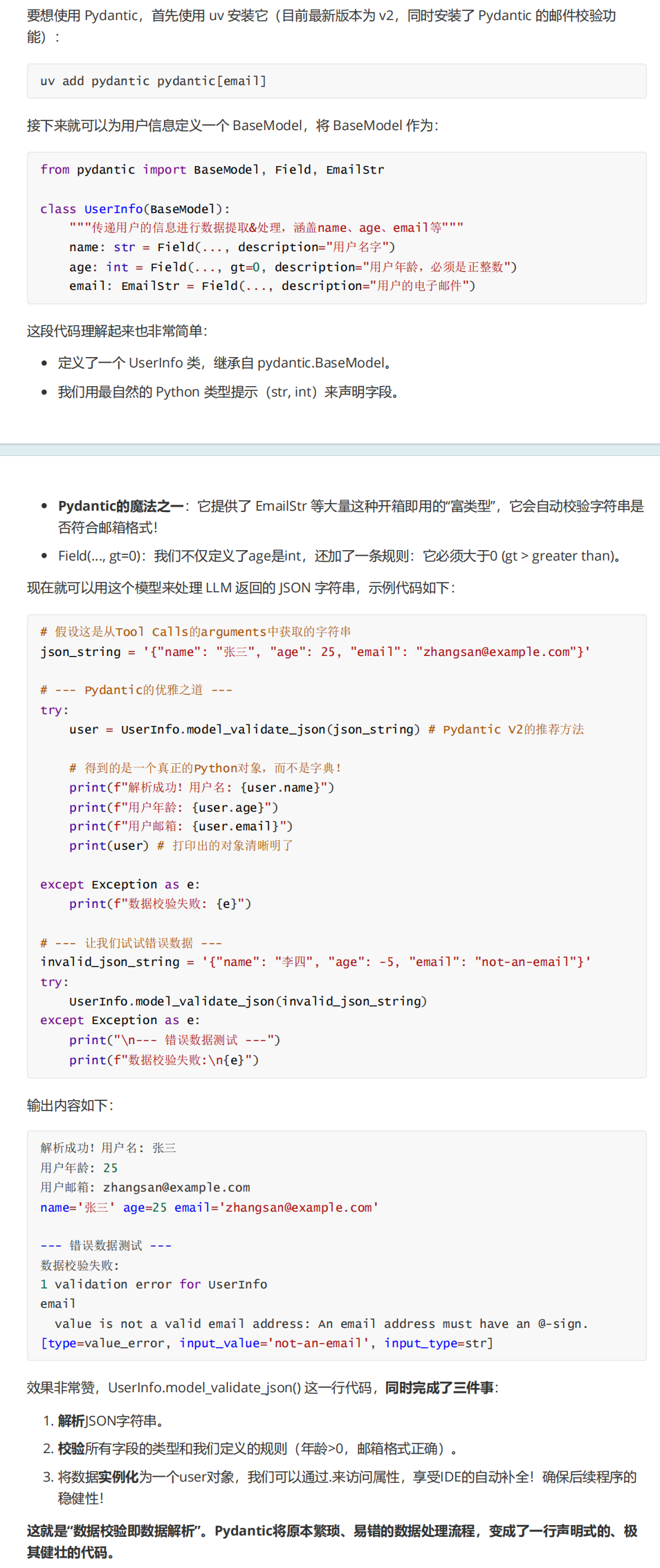
uv add pydantic pydantic[email]

#!/usr/bin/env python
# -*- coding: utf-8 -*-
"""
@Time    : 2025/7/6 20:28
@Author  : thezehui@gmail.com
@File    : 3_8_Pydantic解析数据.py
"""
from pydantic import BaseModel, Field, EmailStr


class UserInfo(BaseModel):
    """传递用户的信息进行数据提取&处理,涵盖name、age、email等"""
    name: str = Field(..., description="用户名字")
    age: int = Field(..., description="用户年龄,必须是正整数")
    email: EmailStr = Field(..., description="用户的电子邮件")


# 假设这是从Tool Calls的arguments中获取的字符串
json_string = '{"name": "张三", "age": 25, "email": "zhangsan@example.com"}'

# --- Pydantic的优雅之道 ---
try:
    user = UserInfo.model_validate_json(json_string)  # Pydantic V2的推荐方法

    # 得到的是一个真正的Python对象,而不是字典!
    print(f"解析成功!用户名: {user.name}")
    print(f"用户年龄: {user.age}")
    print(f"用户邮箱: {user.email}")
    print(user)  # 打印出的对象清晰明了

except Exception as e:
    print(f"数据校验失败: {e}")

# --- 让我们试试错误数据 ---
invalid_json_string = '{"name": "李四", "age": -5, "email": "not-an-email"}'
try:
    UserInfo.model_validate_json(invalid_json_string)
except Exception as e:
    print("\n--- 错误数据测试 ---")
    print(f"数据校验失败:\n{e}")

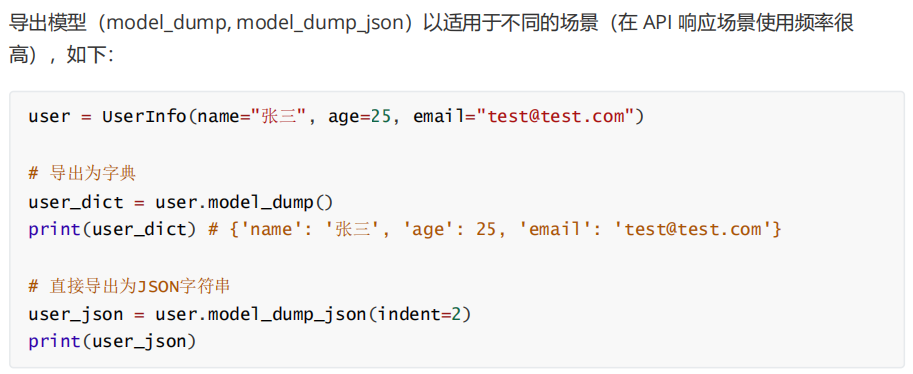

#!/usr/bin/env python
# -*- coding: utf-8 -*-
"""
@Time    : 2025/7/5 11:50
@Author  : thezehui@gmail.com
@File    : 3_8_Pydantic结合Tool Calls实现数据提取.py
"""
import dotenv
from openai import OpenAI
from pydantic import BaseModel, Field, EmailStr

dotenv.load_dotenv()


class UserInfo(BaseModel):
    """传递用户的信息进行数据提取&处理,涵盖name、age、email"""
    name: str = Field(..., description="用户名字")
    age: int = Field(..., gt=0, description="用户年龄,必须是正整数")
    email: EmailStr = Field(..., description="用户的电子邮件")


client = OpenAI(base_url="http://192.168.8.221:9026/v1")

response = client.chat.completions.create(
    model="Qwen3.5-27B-FP8",
    messages=[
        {"role": "user", "content": "我叫泽辉呀,今年18岁,我的联系方式是zehuiya@163.com"}
    ],
    tools=[
        {   # 这里注册的并不是 Python 函数,而是告诉 LLM:"请按照这个 JSON Schema 输出数据。"
            "type": "function",
            "function": {
                "name": UserInfo.__name__,
                "description": UserInfo.__doc__,
                "parameters": UserInfo.model_json_schema(),
            }
        }
    ],
    tool_choice={"type": "function", "function": {"name": UserInfo.__name__}}    # 强制要求大模型调用指定的 Tool(Function)。
)


print(response.choices[0].message.tool_calls[0].function.arguments)
print("-----------------------------------------------------------")

user_info = UserInfo.model_validate_json(response.choices[0].message.tool_calls[0].function.arguments)

print(user_info.name)

print("-----------------------------------------------------------")

print(UserInfo.model_json_schema())


#!/usr/bin/env python
# -*- coding: utf-8 -*-
"""
@Time    : 2025/7/6 1:01
@Author  : thezehui@gmail.com
@File    : 3_9_DeepSeek JSON Output示例.py
"""
import dotenv
from openai import OpenAI
from pydantic import BaseModel, Field

dotenv.load_dotenv()


class SplitTask(BaseModel):
    task_count: int = Field(..., gt=0, le=10, description="拆分的子任务总数")
    tasks: list[str] = Field(..., description="拆分的任务列表")


client = OpenAI(base_url="http://192.168.8.221:9026/v1")

system_prompt = """用户将提问一个问题,请拆解这个问题为多个串联的小任务,拆解的小任务数量不超过10个,你可以使用任何假设的工具、LLM、代码等。
并以json格式输出,其中task_count字段代表拆分任务的总数,tasks为拆分的任务数组(tasks数组内的每个元素都是一个字符串,有顺序之分)。

示例输入:
今天广州的天气怎样?

示例输出:
{
    "task_count": 3,
    "tasks": ["调用浏览器搜索今天的时间", "调用浏览器搜索广州的天气", "综合搜索的结果/内容调用LLM整理答案并回复用户"]
}
"""

while True:
    user_prompt = input("Query: ").strip()
    if user_prompt.lower() == "quit":
        break

    messages = [
        {"role": "system", "content": system_prompt},
        {"role": "user", "content": user_prompt},
    ]

    response = client.chat.completions.create(
        model="Qwen3.5-27B-FP8",
        messages=messages,
        response_format={"type": "json_object"}
    )

    split_task = SplitTask.model_validate_json(response.choices[0].message.content)     # 把大模型返回的 JSON字符串,解析成 SplitTask 这个 Pydantic 模型对象,并进行字段校验 + 类型转换。

    print(split_task)

    print("拆解任务数: ", split_task.task_count)
    for idx, task in enumerate(split_task.tasks):
        print(f"{str(idx + 1).zfill(2)}.{task}")

    print("===============\n")


#!/usr/bin/env python
# -*- coding: utf-8 -*-
"""
@Time    : 2025/7/6 2:34
@Author  : thezehui@gmail.com
@File    : 3_10_使用流式输出提升响应速度.py
"""
import json

import dotenv
from openai import OpenAI
from openai.types.chat.chat_completion_chunk import ChoiceDeltaToolCall

dotenv.load_dotenv()


def calculator(expression: str) -> str:
    """一个简单的计算器,可以执行数学表达式"""
    try:
        result = eval(expression)
        return json.dumps({"result": result})
    except Exception as e:
        return json.dumps({"error": f"无效表达式, 错误信息: {str(e)}"})


class ReActAgent:
    def __init__(self):
        self.client = OpenAI(base_url="http://192.168.8.221:9026/v1")
        self.messages = [
            {
                "role": "system",
                "content": "你是一个强大的聊天机器人,请根据用户的提问进行答复,如果需要调用工具请直接调用,不知道请直接回复不清楚"
            }
        ]
        self.model = "Qwen3.5-27B-FP8"
        self.available_tools = {"calculator": calculator}
        self.tools = [
            {
                "type": "function",
                "function": {
                    "name": "calculator",
                    "description": "一个可以计算数学表达式的计算器",
                    "parameters": {
                        "type": "object",
                        "properties": {
                            "expression": {
                                "type": "string",
                                "description": "需要计算的数学表达式,例如:'123+456+789'"
                            }
                        },
                        "required": ["expression"]
                    }
                }
            }
        ]

    def process_query(self, query: str) -> None:
        # 将用户传递的数据添加到消息列表中
        self.messages.append({"role": "user", "content": query})
        print("Assistant: ", end="", flush=True)

        # 调用deepseek发起请求
        response = self.client.chat.completions.create(
            model=self.model,
            messages=self.messages,
            tools=self.tools,
            stream=True,
        )

        # 设置变量判断是否执行工具调用、组装content、组装tool_calls
        is_tool_calls = False
        content = ""
        tool_calls_obj: dict[str, ChoiceDeltaToolCall] = {}

        for chunk in response:
            # 叠加内容和工具调用
            chunk_content = chunk.choices[0].delta.content
            chunk_tool_calls = chunk.choices[0].delta.tool_calls

            if chunk_content:
                content += chunk_content
            if chunk_tool_calls:
                for chunk_tool_call in chunk_tool_calls:
                    if tool_calls_obj.get(chunk_tool_call.index) is None:
                        tool_calls_obj[chunk_tool_call.index] = chunk_tool_call
                    else:
                        tool_calls_obj[chunk_tool_call.index].function.arguments += chunk_tool_call.function.arguments

            # 如果是直接生成则流式打印输出的内容
            if chunk_content:
                print(chunk_content, end="", flush=True)

            # 如果还未区分出生成的内容是答案还是工具调用,则循环判断
            if is_tool_calls is False:
                if chunk_tool_calls:
                    is_tool_calls = True

        # 如果是工具调用,则需要将tool_calls_obj转换成列表
        tool_calls_json = [tool_call for tool_call in tool_calls_obj.values()]

        # 将模型第一次回复的内容添加到历史消息中
        self.messages.append({
            "role": "assistant",
            "content": content if content != "" else None,
            "tool_calls": tool_calls_json if tool_calls_json else None,
        })

        if is_tool_calls:
            # 循环调用对应的工具
            for tool_call in tool_calls_json:
                tool_name = tool_call.function.name   # 工具名称
                tool_args = json.loads(tool_call.function.arguments)   # 工具参数
                print("\nTool Call: ", tool_name)
                print("Tool Parameters: ", tool_args)
                function_to_call = self.available_tools[tool_name]

                # 调用工具
                result = function_to_call(**tool_args)
                print(f"Tool [{tool_name}] Result: {result}")

                # 将工具结果添加到历史消息中
                self.messages.append({
                    "tool_call_id": tool_call.id,
                    "role": "tool",
                    "name": tool_name,
                    "content": result,
                })

            # 再次调用模型,让它基于工具调用的结果生成最终回复内容
            second_response = self.client.chat.completions.create(
                model=self.model,
                messages=self.messages,
                tools=self.tools,
                tool_choice="none",
                stream=True,
            )
            print("Assistant: ", end="", flush=True)
            for chunk in second_response:
                print(chunk.choices[0].delta.content, end="", flush=True)

        print("\n")

    def chat_loop(self):
        """运行循环对话"""
        while True:
            try:
                # 获取用户的输入
                query = input("Query: ").strip()
                if query.lower() == "quit":
                    break
                self.process_query(query)
            except Exception as e:
                print(f"\nError: {str(e)}")


if __name__ == "__main__":
    ReActAgent().chat_loop()

#!/usr/bin/env python
# -*- coding: utf-8 -*-
"""
@Time    : 2025/7/6 18:17
@Author  : thezehui@gmail.com
@File    : 3_11_DeepSeek语音播报助手.py
"""
import json
import tempfile

import dotenv
import keyboard
import numpy as np
import sounddevice as sd
import soundfile as sf
from openai import OpenAI

dotenv.load_dotenv()

base_url = "https://yunwu.ai/v1"
api_key = "sk-jw7lxHFNwj7OgDbyA1AZT2CxFSR2ejKRhmpvCzLU6SSF6bUW"


def calculator(expression: str) -> str:
    """一个简单的计算器,可以执行数学表达式"""
    try:
        result = eval(expression)
        return json.dumps({"result": result})
    except Exception as e:
        return json.dumps({"error": f"无效表达式, 错误信息: {str(e)}"})


class ReActAgent:
    def __init__(self):
        self.client = OpenAI()
        self.messages = [
            {
                "role": "system",
                "content": "你是一个强大的聊天机器人,请根据用户的提问进行答复,如果需要调用工具请直接调用,不知道请直接回复不清楚"
            }
        ]
        self.model = "deepseek-chat"
        self.available_tools = {"calculator": calculator}
        self.tools = [
            {
                "type": "function",
                "function": {
                    "name": "calculator",
                    "description": "一个可以计算数学表达式的计算器",
                    "parameters": {
                        "type": "object",
                        "properties": {
                            "expression": {
                                "type": "string",
                                "description": "需要计算的数学表达式,例如:'123+456+789'"
                            }
                        },
                        "required": ["expression"]
                    }
                }
            }
        ]

    def process_query(self, query: str) -> str:
        """使用deepseek处理用户输出"""
        self.messages.append({"role": "user", "content": query})

        # 调用deepseek发起请求
        response = self.client.chat.completions.create(
            model=self.model,
            messages=self.messages,
            tools=self.tools,
        )

        # 获取响应消息+工具响应
        response_message = response.choices[0].message
        tool_calls = response_message.tool_calls

        # 将模型第一次回复添加到历史消息中
        self.messages.append(response_message.model_dump())

        # 判断是否执行工具调用
        if tool_calls:

            # 循环执行工具调用
            for tool_call in tool_calls:
                print("Tool Call: ", tool_call.function.name)
                tool_name = tool_call.function.name
                tool_args = json.loads(tool_call.function.arguments)
                function_to_call = self.available_tools[tool_name]

                # 调用工具
                result = function_to_call(**tool_args)
                print(f"Tool [{tool_name}] Result: {result}")

                # 将工具结果添加到历史消息中
                self.messages.append({
                    "tool_call_id": tool_call.id,
                    "role": "tool",
                    "name": tool_name,
                    "content": result,
                })

            # 再次调用模型,让它基于工具调用的结果生成最终回复内容
            second_response = self.client.chat.completions.create(
                model=self.model,
                messages=self.messages,
                tools=self.tools,
                tool_choice="none",
            )

            self.messages.append(second_response.choices[0].message.model_dump())
            return "Assistant: " + second_response.choices[0].message.content
        else:
            return "Assistant: " + response_message.content

    def chat_loop(self):
        """运行循环对话"""
        while True:
            try:
                # 获取用户的输入
                query = self.speech_to_text().strip()
                print(f"\nQuery: {query}")
                if query == "退出":
                    break

                # 获取Agent的输出并播放语音
                answer = self.process_query(query)
                print(answer)
                self.text_to_speech(answer)
            except Exception as e:
                print(f"\nError: {str(e)}")

    @classmethod
    def speech_to_text(cls) -> str:
        """根据语音信息获取文本的输入内容"""
        samplerate = 16000
        channels = 1
        recording = []
        is_recording = False

        print("按空格开始录音,再按一次空格停止录音...")

        def callback(indata, frames, time, status):
            if is_recording:
                recording.append(indata.copy())

        stream = sd.InputStream(samplerate=samplerate, channels=channels, callback=callback)
        stream.start()

        # 等待第一次空格:开始录音
        keyboard.wait("space")
        is_recording = True
        print("录音中... 再按一次空格停止")

        # 等待第二次空格:停止录音
        keyboard.wait("space")
        is_recording = False
        stream.stop()
        stream.close()
        print("录音结束")

        # 把片段拼接成一个 numpy 数组
        if not recording:
            print("没有录到声音")
            return ""

        audio_data = np.concatenate(recording, axis=0)

        # 保存到临时文件
        with tempfile.NamedTemporaryFile(suffix=".wav", delete=False) as tmpfile:
            sf.write(tmpfile.name, audio_data, samplerate)
            audio_path = tmpfile.name

        # 调用 OpenAI API 语音转文本
        with open(audio_path, "rb") as audio_file:
            client = OpenAI(base_url=base_url, api_key=api_key)
            transcript = client.audio.transcriptions.create(
                model="whisper-1",
                file=audio_file
            )

        return transcript.text

    @classmethod
    def text_to_speech(cls, text: str) -> None:
        # 调用 OpenAI TTS 生成语音
        client = OpenAI(base_url=base_url, api_key=api_key)
        response = client.audio.speech.create(
            model="tts-1",  # 文本转语音模型
            voice="alloy",  # 可选:alloy, verse, etc.
            input=text
        )

        # 保存临时文件
        with tempfile.NamedTemporaryFile(suffix=".wav", delete=False) as tmpfile:
            tmpfile.write(response.read())
            audio_path = tmpfile.name

        # 播放语音
        data, samplerate = sf.read(audio_path)
        sd.play(data, samplerate)
        sd.wait()  # 等待播放完成


if __name__ == "__main__":
    ReActAgent().chat_loop()

#!/usr/bin/env python
# -*- coding: utf-8 -*-
"""
@Time    : 2025/7/7 11:21
@Author  : thezehui@gmail.com
@File    : 4_2_计算消息上下文长度.py
"""
import transformers

# 创建分词器
tokenizer = transformers.AutoTokenizer.from_pretrained(
    "/data_4/googosoft_file/AAA_agent/Mcp_Manus/imooc-mas/mas-study/resources/tokenizer",
    trust_remote_code=True
)

prompt = "你好,你是?"
messages = [{"role": "user", "content": "帮我计算下45243*123"}]

print("prompt: ", len(tokenizer.encode("你好,你是?")))
print("messages: ", len(tokenizer.apply_chat_template(messages)))


#!/usr/bin/env python
# -*- coding: utf-8 -*-
"""
@Time    : 2025/7/8 0:27
@Author  : thezehui@gmail.com
@File    : 4_3_ReAct Agent为LLM添加CoT.py
"""
import json

import dotenv
from openai import OpenAI
from openai.types.chat.chat_completion_chunk import ChoiceDeltaToolCall

dotenv.load_dotenv()


def calculator(expression: str) -> str:
    """一个简单的计算器,可以执行数学表达式"""
    try:
        result = eval(expression)
        return json.dumps({"result": result})
    except Exception as e:
        return json.dumps({"error": f"无效表达式, 错误信息: {str(e)}"})


class ReActAgent:
    def __init__(self):
        self.client = OpenAI(base_url="http://192.168.8.221:9026/v1")
        self.messages = [
            {
                "role": "system",
                "content": """你是一个擅长逻辑推理的AI助手。
对于用户提出的任何需要解决的问题,你必须严格遵循以下格式进行回答:

1. 在`<think>`标签内,详细展示你的思考过程,将问题分解为多个步骤,并逐步进行推理和演算。
2. 在`<answer>`标签内,仅提供最终的、明确的答案。

确保你的回答不包含`<think>`和`<answer>`标签之外的任何多余文字。"""
            }
        ]
        self.model = "Qwen3.5-27B-FP8"
        self.available_tools = {"calculator": calculator}
        self.tools = [
            {
                "type": "function",
                "function": {
                    "name": "calculator",
                    "description": "一个可以计算数学表达式的计算器",
                    "parameters": {
                        "type": "object",
                        "properties": {
                            "expression": {
                                "type": "string",
                                "description": "需要计算的数学表达式,例如:'123+456+789'"
                            }
                        },
                        "required": ["expression"]
                    }
                }
            }
        ]

    def process_query(self, query: str) -> None:
        # 将用户传递的数据添加到消息列表中
        self.messages.append({"role": "user", "content": query})
        print("Assistant: ", end="", flush=True)

        # 调用deepseek发起请求
        response = self.client.chat.completions.create(
            model=self.model,
            messages=self.messages,
            tools=self.tools,
            stream=True,
        )

        # 设置变量判断是否执行工具调用、组装content、组装tool_calls
        is_tool_calls = False
        content = ""
        tool_calls_obj: dict[str, ChoiceDeltaToolCall] = {}

        for chunk in response:
            # 叠加内容和工具调用
            chunk_content = chunk.choices[0].delta.content
            chunk_tool_calls = chunk.choices[0].delta.tool_calls

            if chunk_content and chunk is not None:
                content += chunk_content
            if chunk_tool_calls:
                for chunk_tool_call in chunk_tool_calls:
                    if tool_calls_obj.get(chunk_tool_call.index) is None:
                        tool_calls_obj[chunk_tool_call.index] = chunk_tool_call
                    elif chunk_tool_call.function.arguments is not None:
                        tool_calls_obj[chunk_tool_call.index].function.arguments += chunk_tool_call.function.arguments

            # 如果是直接生成则流式打印输出的内容
            if chunk_content:
                print(chunk_content, end="", flush=True)

            # 如果还未区分出生成的内容是答案还是工具调用,则循环判断
            if is_tool_calls is False:
                if chunk_tool_calls:
                    is_tool_calls = True

        # 如果是工具调用,则需要将tool_calls_obj转换成列表
        tool_calls_json = [tool_call for tool_call in tool_calls_obj.values()]

        # 将模型第一次回复的内容添加到历史消息中
        self.messages.append({
            "role": "assistant",
            "content": content if content != "" else None,
            "tool_calls": tool_calls_json if tool_calls_json else None,
        })

        if is_tool_calls:
            # 循环调用对应的工具
            for tool_call in tool_calls_json:
                tool_name = tool_call.function.name
                tool_args = json.loads(tool_call.function.arguments)
                print("\nTool Call: ", tool_name)
                print("Tool Parameters: ", tool_args)
                function_to_call = self.available_tools[tool_name]

                # 调用工具
                result = function_to_call(**tool_args)
                print(f"Tool [{tool_name}] Result: {result}")

                # 将工具结果添加到历史消息中
                self.messages.append({
                    "tool_call_id": tool_call.id,
                    "role": "tool",
                    "name": tool_name,
                    "content": result,
                })

            # 再次调用模型,让它基于工具调用的结果生成最终回复内容
            second_response = self.client.chat.completions.create(
                model=self.model,
                messages=self.messages,
                tools=self.tools,
                tool_choice="none",
                stream=True,
            )
            print("Assistant: ", end="", flush=True)
            for chunk in second_response:
                print(chunk.choices[0].delta.content, end="", flush=True)

        print("\n")

    def chat_loop(self):
        """运行循环对话"""
        while True:
            try:
                # 获取用户的输入
                query = input("Query: ").strip()
                if query.lower() == "quit":
                    break
                self.process_query(query)
            except Exception as e:
                print(f"\nError: {str(e)}")


if __name__ == "__main__":
    ReActAgent().chat_loop()

#!/usr/bin/env python
# -*- coding: utf-8 -*-
"""
@Time    : 2025/7/8 12:13
@Author  : thezehui@gmail.com
@File    : 4_5_同步咖啡店.py
"""
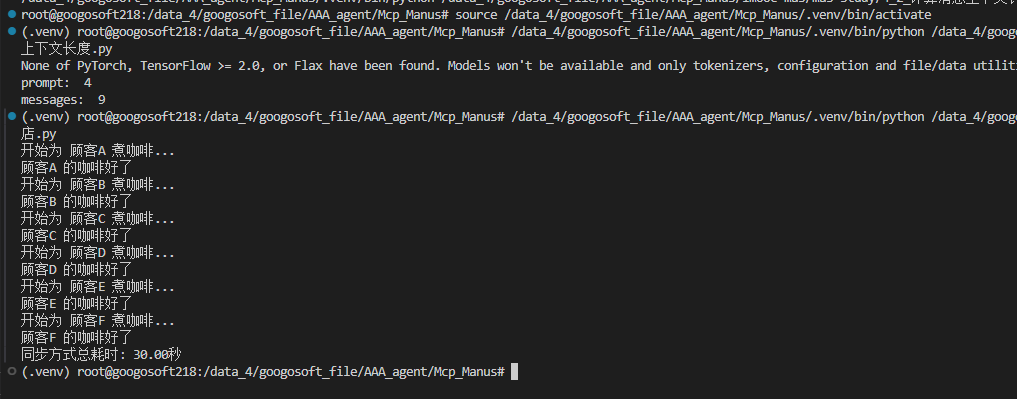
import time


def make_coffee(customer: str) -> None:
    print(f"开始为 {customer} 煮咖啡...")
    time.sleep(5)  # 模拟耗时的I/O操作,例如:LLM请求调用获取结果
    print(f"{customer} 的咖啡好了")


def main_sync():
    start_time = time.time()
    make_coffee("顾客A")
    make_coffee("顾客B")
    make_coffee("顾客C")
    make_coffee("顾客D")
    make_coffee("顾客E")
    make_coffee("顾客F")
    end_time = time.time()
    print(f"同步方式总耗时: {end_time - start_time:.2f}秒")


if __name__ == "__main__":
    main_sync()

#!/usr/bin/env python
# -*- coding: utf-8 -*-
"""
@Time    : 2025/7/8 12:19
@Author  : thezehui@gmail.com
@File    : 4_5_异步咖啡店.py
"""
import asyncio
import time


async def make_coffee_async(customer: str) -> None:
    print(f"开始为 {customer} 煮咖啡...")
    await asyncio.sleep(5)
    print(f"{customer} 的咖啡好了")
    return f"{customer}的咖啡"


async def main_async():
    start_time = time.time()

    # 创建任务清单
    tasks = [
        make_coffee_async("顾客A"),
        make_coffee_async("顾客B"),
        make_coffee_async("顾客C"),
        make_coffee_async("顾客D"),
        make_coffee_async("顾客E"),
        make_coffee_async("顾客F"),
    ]

    results = await asyncio.gather(*tasks)
    print("所有咖啡都准备好了:", results)

    end_time = time.time()
    print(f"异步方式总耗时: {end_time - start_time:.2f}秒")


if __name__ == "__main__":
    asyncio.run(main_async())

#!/usr/bin/env python
# -*- coding: utf-8 -*-
"""
@Time    : 2025/9/5 15:32
@Author  : thezehui@gmail.com
@File    : 3_6 OpenAI SDK重构多模态LLM调用.py
"""
import base64
import os

import dotenv
from openai import OpenAI

dotenv.load_dotenv()

client = OpenAI(
    base_url="https://api.moonshot.cn/v1",
    api_key=os.getenv('MOONSHOT_API_KEY'),
)

image_path = "./resources/广州塔.jpeg"

with open(image_path, "rb") as f:
    image_data = f.read()

# 使用python标准的base64.b64encode函数将图片编码成base64字符串
image_url = f"data:image/jpeg;base64,{base64.b64encode(image_data).decode('utf-8')}"

response = client.chat.completions.create(
    model="moonshot-v1-8k-vision-preview",
    messages=[
        {
            "role": "user",
            "content": [
                {"type": "text", "text": "请描述下这张图片,这张图片所在位置是哪里呢?"},
                {"type": "image_url", "image_url": {"url": image_url}}
            ]
        }
    ]
)

print(response.choices[0].message.content)
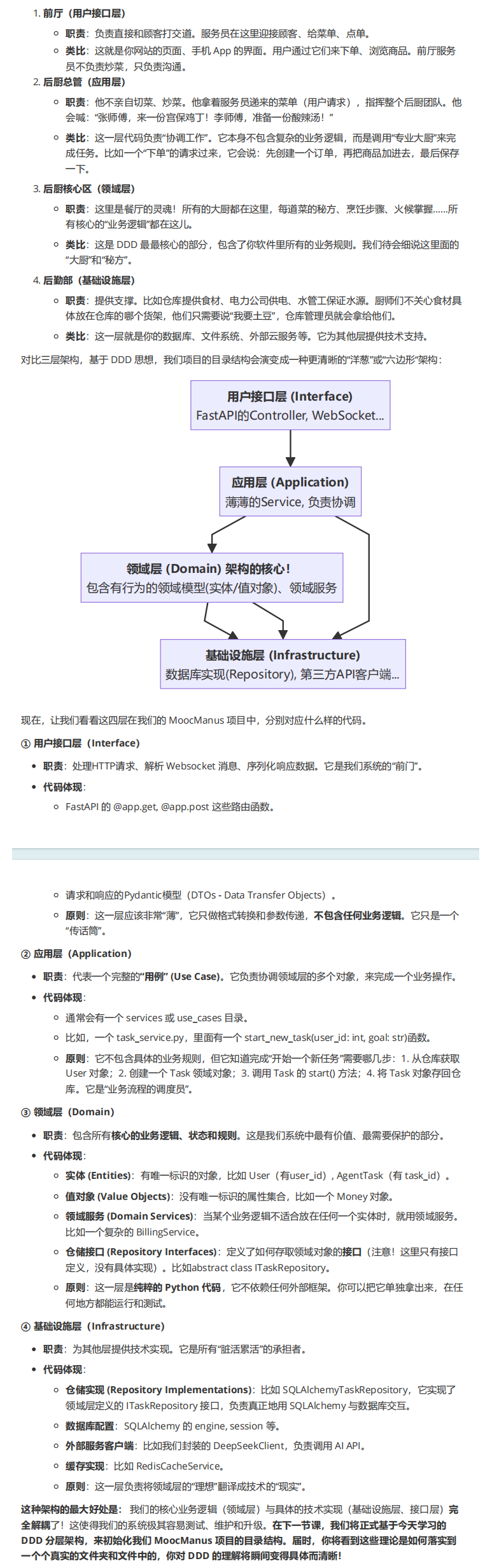
领域驱动设计
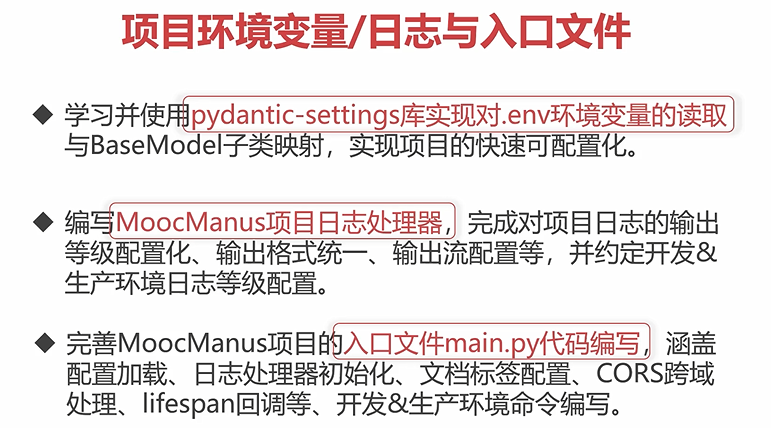
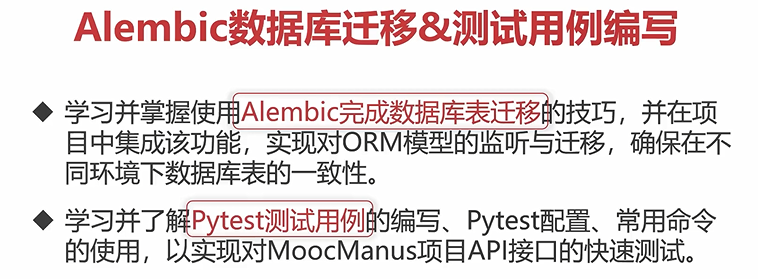
.env相关配置案例
#!/usr/bin/env python
# -*- coding: utf-8 -*-
"""
@Time    : 2025/5/14 10:44
@Author  : thezehui@gmail.com
@File    : config.py
"""
from functools import lru_cache  # 此为装饰器函数,被这个函数装饰的函数会在整个项目的声明周期中仅加载一次
from typing import Optional

from pydantic_settings import BaseSettings, SettingsConfigDict


class Settings(BaseSettings):
    """MoocManus后端中控配置信息,从.env或者环境变量中加载数据"""

    # 项目基础配置
    env: str = "development"
    log_level: str = "INFO"   # 日志等级
    app_config_filepath: str = "config.yaml"

    # 数据库相关配置
    sqlalchemy_database_uri: str = "postgresql+asyncpg://postgres:postgres@localhost:5432/manus"

    # Redis缓存配置
    redis_host: str = "localhost"
    redis_port: int = 6379
    redis_db: int = 0
    redis_password: str | None = None

    # Cos腾讯云对象存储配置
    cos_secret_id: str = ""
    cos_secret_key: str = ""
    cos_region: str = ""
    cos_scheme: str = "https"
    cos_bucket: str = ""
    cos_domain: str = ""

    # Sandbox配置
    sandbox_address: Optional[str] = None
    sandbox_image: Optional[str] = None
    sandbox_name_prefix: Optional[str] = None
    sandbox_ttl_minutes: Optional[int] = 60
    sandbox_network: Optional[str] = None
    sandbox_chrome_args: Optional[str] = ""
    sandbox_https_proxy: Optional[str] = None
    sandbox_http_proxy: Optional[str] = None
    sandbox_no_proxy: Optional[str] = None

    # 使用pydantic v2的写法来完成环境变量信息的告知
    model_config = SettingsConfigDict(
        env_file=".env",
        env_file_encoding="utf-8",
        extra="ignore",
    )


@lru_cache()
def get_settings() -> Settings:
    """获取当前MoocManus项目的配置信息,并对内容进行缓存,避免重复读取"""
    settings = Settings()
    return settings


if __name__=="__main__":
    sttings=Settings()
    print(sttings)


AtomGit AI 社区提供模型库、数据集、Agent、Token等资源
更多推荐
 0
0 0
0- 0


 已为社区贡献1条内容

所有评论(0)