
mac下,pycharm-notebook自动代码补全功能设置
经过查阅资料,发现需要安装代码自动补全器nbextensions1.1 安装nbextensionspipinstall jupyter_contrib_nbextensions报错:ERROR: Could not build wheels for pyzmq, argon2-cffi-bindings which use PEP 517 and cannot be installed dire
经过查阅资料,发现需要安装代码自动补全器nbextensions
1.1 安装nbextensions
pip install jupyter_contrib_nbextensions报错:
ERROR: Could not build wheels for pyzmq, argon2-cffi-bindings which use PEP 517 and cannot be installed directly
提示pip版本太低,因此更新pip(on treminal)
python -m pip install --upgrade pip然后,重新运行:
pip install jupyter_contrib_nbextensions1.2 用户配置
jupyter contrib nbextension install --user
2.1 安装nbextensions_configurator
pip install jupyter_nbextensions_configurator
2.2 用户配置
jupyter nbextensions_configurator enable --user
3.1 然后关掉pycharm和noebook,重启之后即可看到如下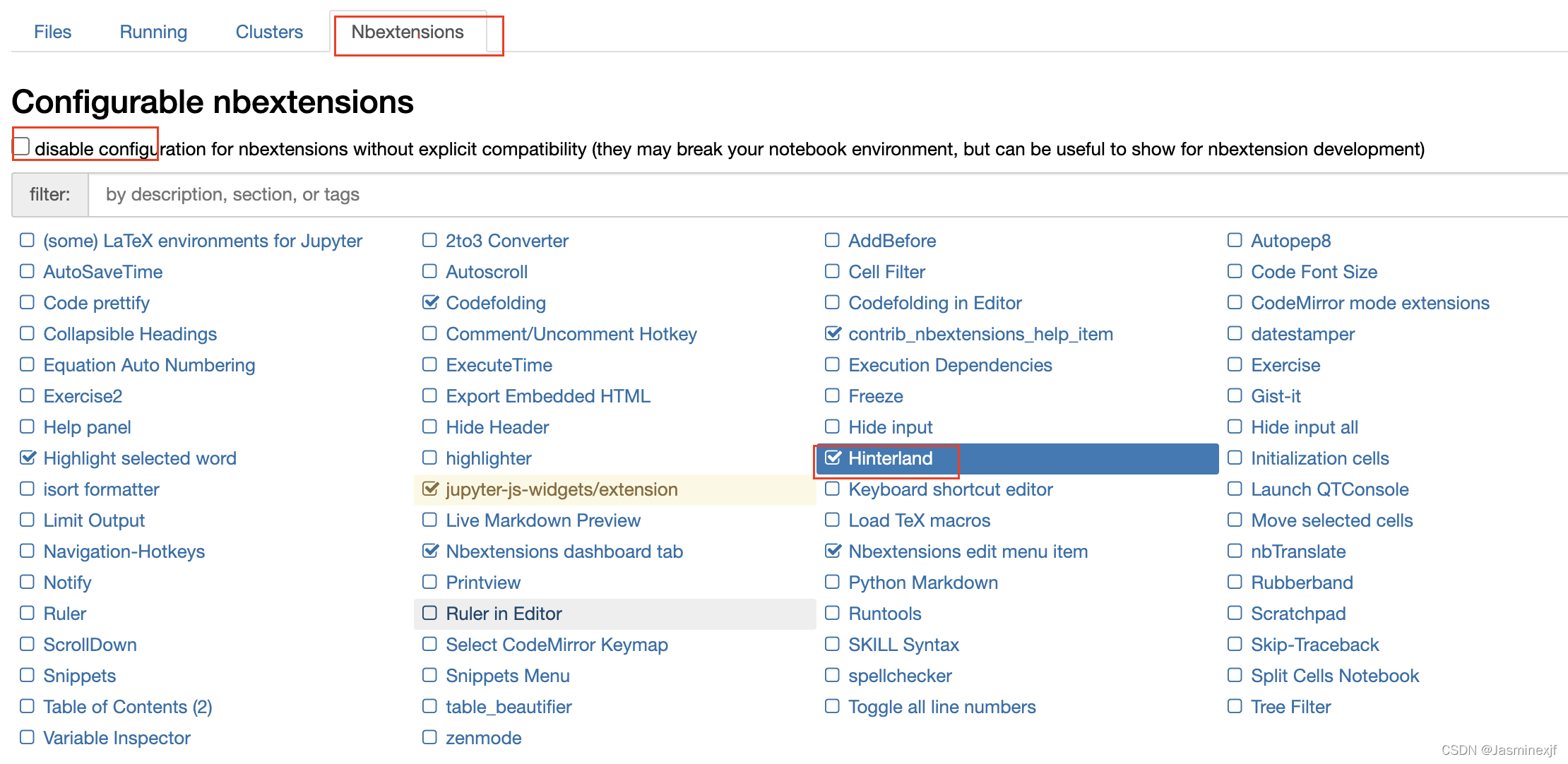
分别从上到下,进行勾选
* 取消勾选 disable
* 然后注意勾选下面选中的部分,一般有部分已经默认
3 效果图

备注: pycharm下,打开网页端notebook最快捷方式
1、安装
pip install jupyter 或者
在interprter中进行搜索安装
2、新建notebook文件(xxx.ipynb)并简单写几行代码,运行;点击notebook中的local地址,即可页面化notebook。
或者 直接命令行jupyter notebook 跳转本地local地址

GitCode AI社区是一款由 GitCode 团队打造的智能助手,AI大模型社区、提供国内外头部大模型及数据集服务。
更多推荐

 2
2 0
0- 0


 已为社区贡献1条内容

所有评论(0)